
CRM as the Control Plane
In a previous article, A HubSpot Deployment Is Not a Project. It’s an Operating Model, I argued that most CRM failures don’t come from poor configuration. They come from what happens after go-live, when ownership fades and systems start to drift.
This piece builds on that idea, but focuses on a specific pressure point I see increasingly in SaaS environments: automation ⚡.
Earlier in my career, while working with a portfolio of SaaS businesses through Bain & Company’s private equity data venture, and since then through ongoing conversations with operators in that space, a consistent pattern emerged.
As automation becomes easier to build and cheaper to deploy, the risk is no longer whether teams can automate. It’s whether automation is being allowed to act in places where the business isn’t ready to stand behind the decision.
That question only makes sense if CRM is treated as a control plane, not just a system of record or a place to log activity.
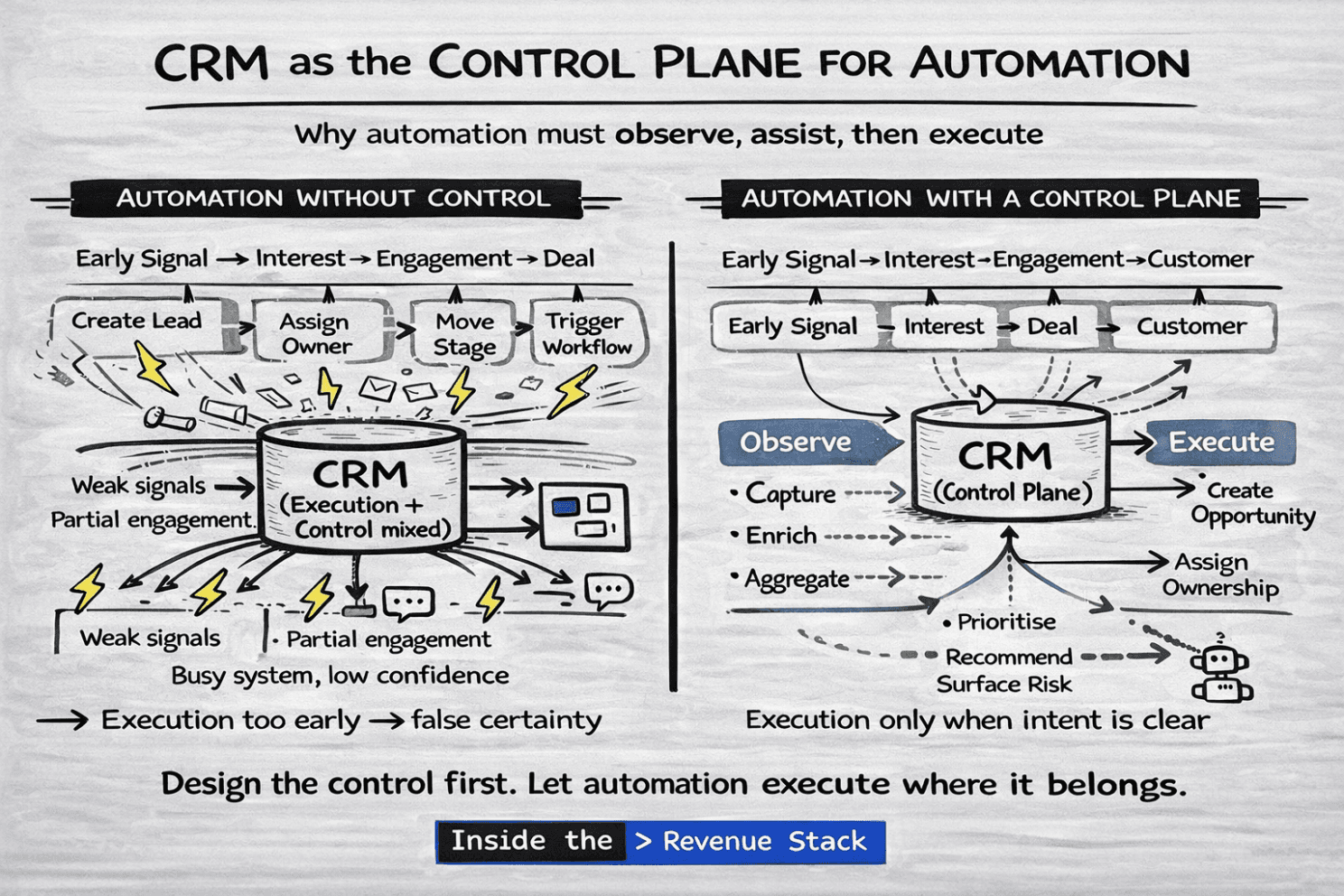
CRM was never meant to be where work happens
Sellers don’t sell in CRM. Buyers don’t buy in CRM.
That has always been true.
What CRM does well, when designed properly, is act as the place where intent becomes binding. It is where lifecycle state is defined, ownership is enforced, decisions are recorded, and downstream execution is triggered.
Problems start when CRM is expected to be both the execution surface and the control layer. In that model, automation creeps too far upstream and begins making decisions before intent is clear. The system stays busy, but confidence erodes.

Automation needs a lifecycle, not just workflows
One of the most common post–go-live failure modes I see is automation executing without architectural intent.
Leads are created on weak signals. Stages move on partial engagement. Ownership is assigned before commitment exists.
Nothing breaks technically. Workflows still fire. Dashboards still update. But trust drops, and manual checks creep back in.
To avoid this, automation needs to be designed relative to the SaaS lifecycle, not layered indiscriminately on top of it.
Example
CRM, the “Brain” of the GTM System - SaaS Illustration
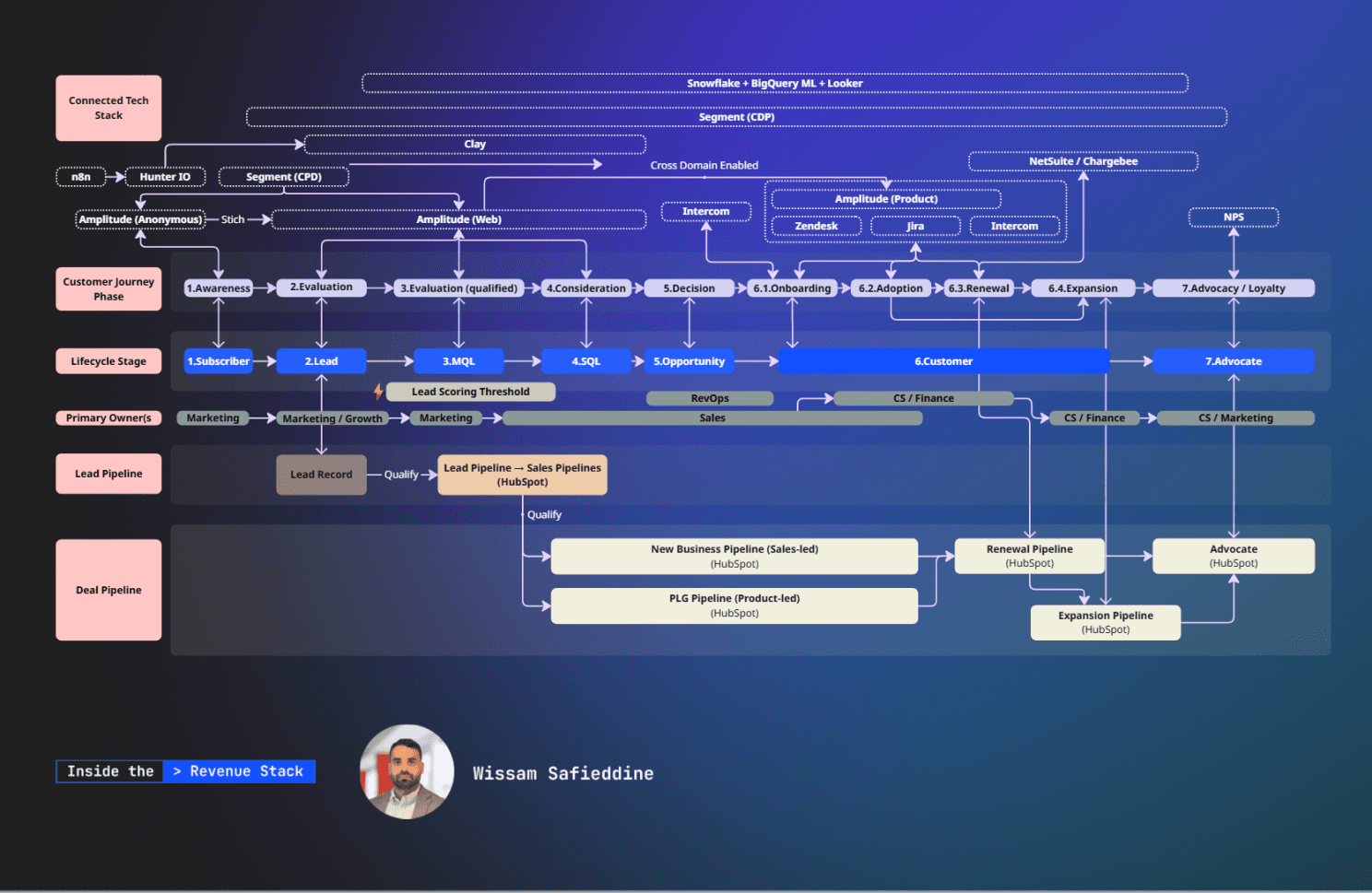
SaaS Illustration- Customer Journey (Customer View), Lifecyle Stages (Operational), and CRM Pipelines
The lifecycle view above is the anchor. It shows how SaaS GTM actually unfolds from early signal through conversion, retention, and expansion. The important point is that automation should not behave the same way at every stage.
Three roles automation should play across the lifecycle
The mistake most teams make is letting automation execute everywhere by default. A more durable approach is to give automation different roles as intent increases.
Observe early
At the top of the funnel and early engagement stages, automation should primarily observe.
This includes capturing signals, aggregating activity across channels, enriching context, and building a picture of intent over time. In SaaS, early signals are plentiful and often misleading.
Treating them as decisions is how pipelines get polluted.
Observation isn’t passive. It’s a deliberate architectural choice.
Assist as intent forms
As intent becomes clearer, automation can move into an assistive role.
This is where automation prioritises accounts, recommends next actions, surfaces risk, and prepares context for sellers or customer teams. Importantly, automation still doesn’t own the decision. It supports execution without enforcing it.
This is where automation delivers real leverage without undermining trust.
Execute late, and deliberately
Execution is where automation should be most constrained.
Execution includes creating or converting lifecycle records, moving stages, assigning ownership, enforcing SLAs, and triggering downstream processes. In SaaS, this should only happen once intent and commitment are explicit.
Execution too early creates false certainty. Execution too late creates operational drag.

Why CRM must act as the control plane
As AI and automation mature, there’s a temptation to push decision-making to the edges of the stack. That works for execution, but it breaks down quickly without a central control layer.
CRM should not be the place where conversations happen. It should be the place where decisions are reconciled.
When CRM acts as the control plane ✈️
Automation enforces agreed rules
Lifecycle transitions remain auditable
Ownership is explicit
Reporting reflects reality, not activity
Tooling examples mentioned are illustrative only. I have no partnership or affiliation with any of the GTM tools referenced. Below is also a high level example.
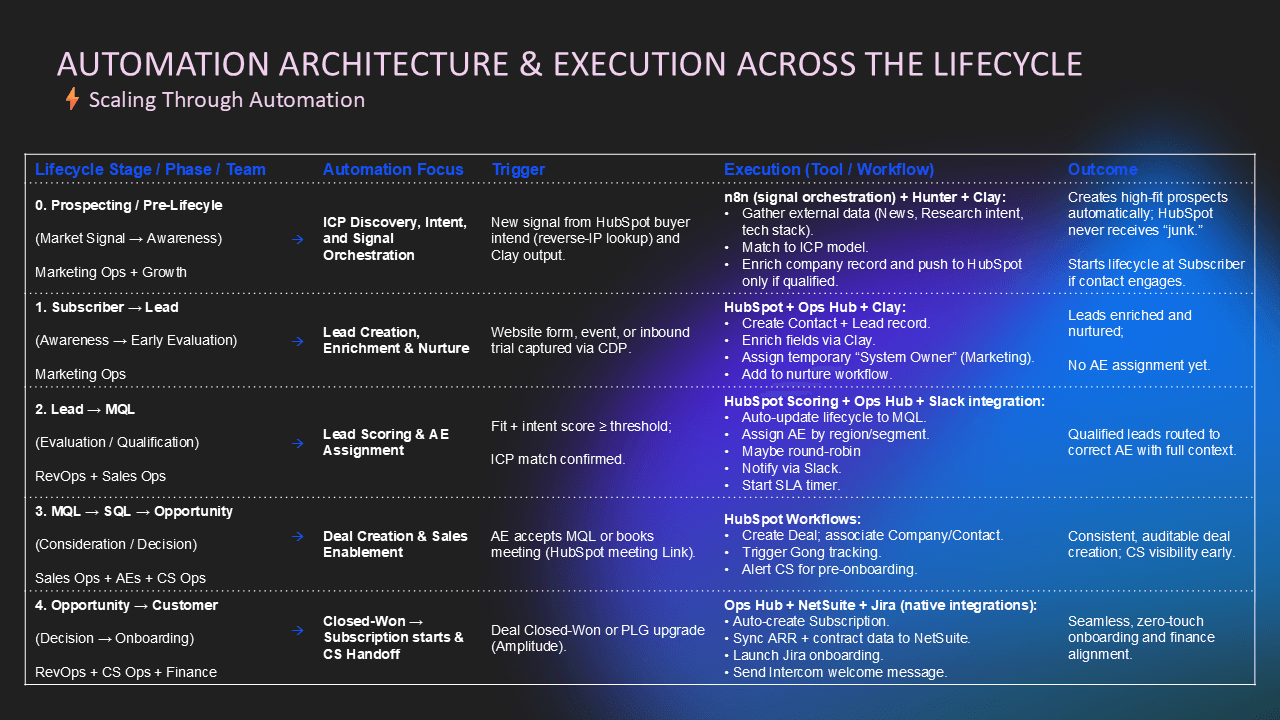
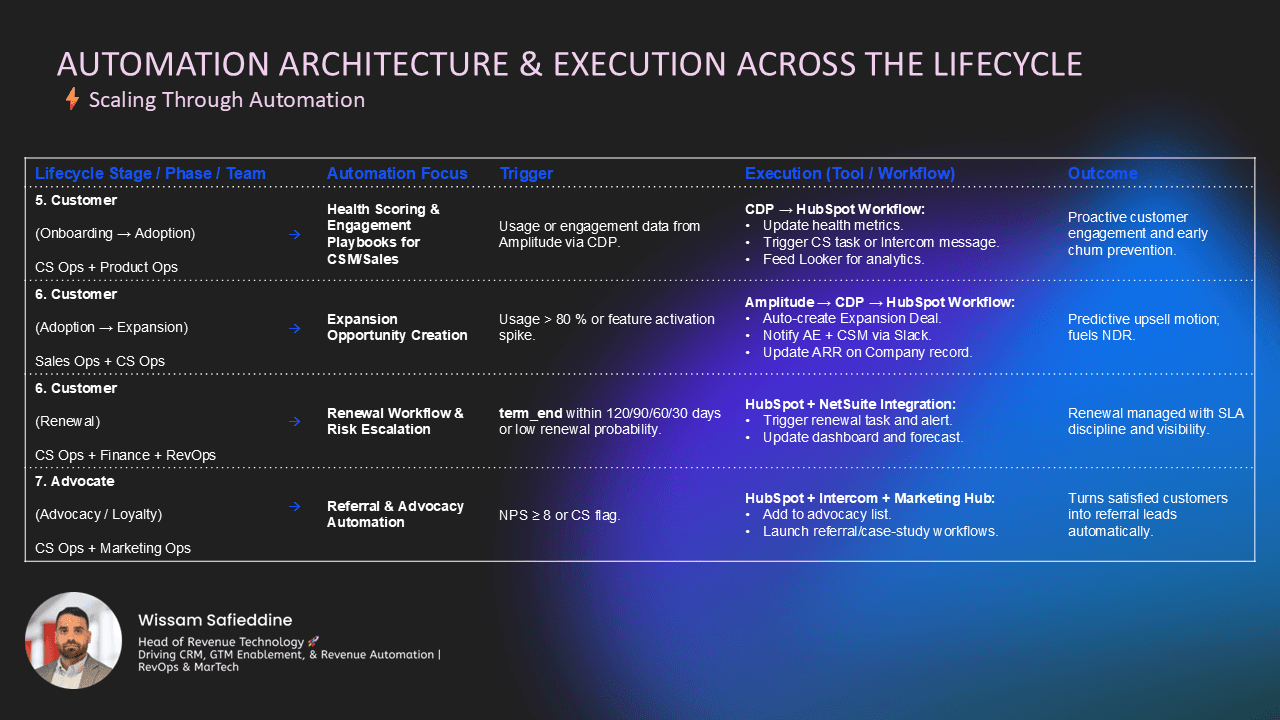
When CRM loses that role, automation doesn’t disappear. It becomes fragmented, opaque, and difficult to trust. This is the same pattern described in the earlier operating-model article.
Automation simply accelerates the consequences.
A simple test for SaaS automation
A useful way to pressure-test any automation is to ask:
Is this observing, assisting, or executing?
If it’s executing, then three follow-up questions matter:
What decision is this automation making on behalf of the business?
Is that decision actually clear at this point in the lifecycle?
Who owns the outcome if it’s wrong?
If those answers aren’t obvious, the automation is probably acting too early.
The real takeaway
Automation doesn’t fix SaaS GTM systems. It amplifies how they’re designed.
Treating HubSpot or any CRM as a feature-rich workspace leads to over-automation and loss of control. Treating it as the control plane allows automation to scale execution without undermining trust.
Just as CRM deployments need an operating model, automation needs an architecture.
Design the control first. Then let automation execute where it actually belongs.

More GTM Design